
Perci resources · Blog
The Alexa prompts on Amazon product pages (and why your listing must answer them)
Last updated: August 30, 2026
Amazon's Alexa asks questions on your product page. If your listing doesn't answer them, Alexa can't recommend or compare your product. Here is how to check and fix it.
What are the Alexa prompts on Amazon product pages?
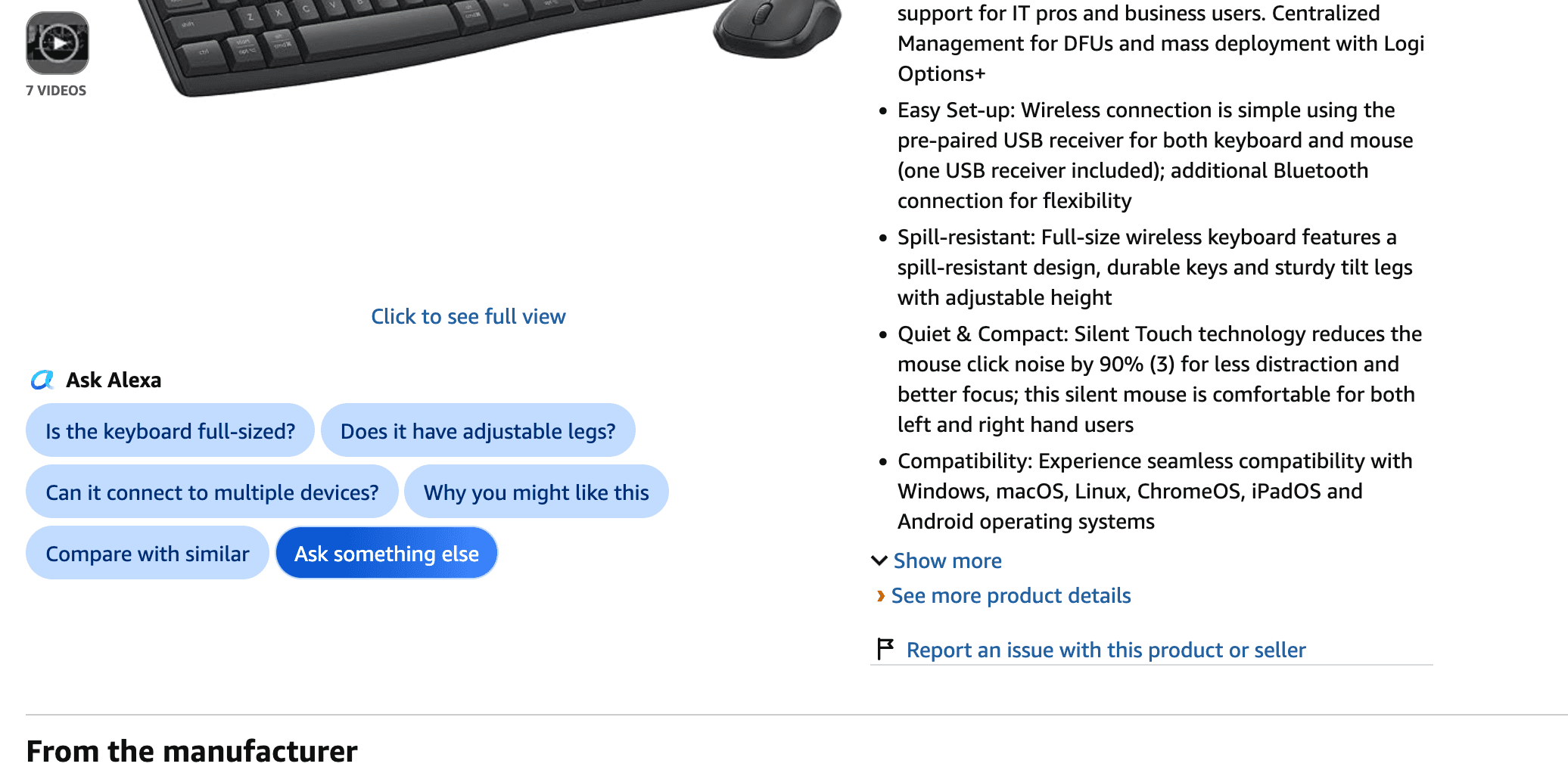
When you open a product detail page (PDP) on Amazon, just under the listing images, you will see a row of blue pills. Each pill is a question shoppers commonly ask about that product: "Does it come with batteries?", "Is it waterproof?", "What sizes are available?"
Those pills are generated by Amazon's AI shopping assistant, Alexa (formerly Rufus). They are not decoration. They are the questions Alexa uses to understand your product, recommend it to shoppers, and compare it against competitors.
Why these prompts matter
The prompts affect two things:
- Whether and how Alexa recommends your listing. Alexa reads your listing to answer the questions shoppers ask. If your listing text answers the question, Alexa can use your product in its answer. If it cannot find the answer, your product is not part of the conversation.
- How Alexa compares your product against competitors.More and more, shoppers are comparing multiple products using Alexa instead of manually scrolling through listings themselves. When a shopper asks "which of these is waterproof?", Alexa compares the products it can answer for. If your listing doesn't state whether it is waterproof, you are not in the comparison.
The prompts give you direct insight into what Alexa is using to recommend (or ignore) products to customers. They are the questions your listing needs to answer.
The key rule: answer the question, even if the answer is no
The most important thing to understand: the answers do not have to be positive.
If a shopper asks "does it come with batteries?" and your product does not include batteries, the right move is to make sure your listing clearly says so. Showing the answer "no" is better than not answering at all.
Here is why. Alexa cannot recommend or compare a product it cannot understand. A listing that answers "no batteries included" is a listing Alexa can work with: it knows the product, it can include it in comparisons, and it can recommend it to shoppers who do not need batteries. A listing that never mentions batteries is a listing Alexa cannot place: it is invisible to the question, and it loses the comparison by default.
Giving Amazon's AI the information it needs to understand your product is what puts your listing in front of shoppers. An incomplete listing is not neutral. It is a listing that gets skipped.
It helps conversion, not just AI visibility
Here is the part most guides miss. The prompts on your product page are not just an AI thing. They are the questions typical shoppers have about your product too.
The same question a shopper types into Alexa, a shopper scrolling your listing is wondering about. If your listing answers "does it come with batteries?" in the bullets, the human shopper gets their answer without leaving the page. If it does not, they either open the Q&A section, or they leave.
So making sure your listing answers the prompts does double duty: it helps Alexa understand and recommend your product, and it helps real shoppers convert. The prompts are a free checklist of the questions your listing should already be answering.
How to do it (the manual method)
The process is simple and takes a few minutes per listing:
- Go to your product page and find the prompts. Open your PDP and look for the blue pills just under the listing images. These are the questions Alexa is asking about your product.
- Check that each question is answered in your copy.For each prompt, search your title, bullets, and description for the answer. The answer does not need to be in the exact words of the question, but it needs to be stated somewhere in your front-end text. "Does it come with batteries?" is answered by a bullet that says "batteries not included."
- Quiz Alexa yourself.Click each prompt and confirm that Alexa gives the correct answer. If Alexa answers from your listing, you are covered. If Alexa answers from reviews or the Q&A section, or says it has no information, your listing is missing the answer.
- Fix the gaps.For any question your listing does not answer, add the answer to your bullets or description. Remember: a clear "no" is better than silence.
The other half: backend attributes
Answering the front-end prompts is one part of Alexa visibility. The other part is backend attribute completion: the structured product data Alexa reads to understand your product, qualify it for recommendations, and surface it in filtered search. Front-end text answers the questions shoppers ask; backend attributes give Alexa the structured facts it relies on.
See our guide to Amazon Content Data Quality Score →
Both matter. Front-end answers win the conversation; backend attributes win the eligibility.
Frequently asked questions
What are the blue pills on my Amazon product page?
They are questions generated by Amazon's AI shopping assistant (Alexa, formerly Rufus), based on what shoppers commonly ask about your product. They appear just under the listing images.
Why do the prompts matter?
Alexa uses your listing text to answer those questions. If your listing answers them, Alexa can recommend and compare your product. If it cannot find the answer, your product is skipped in AI-driven shopping.
Do the answers have to be positive?
No. A clear 'no' (for example, 'batteries not included') is better than no answer. Alexa can work with a product it understands, even when the answer is negative. It cannot recommend a product it cannot place.
Does this help with regular conversion too?
Yes. The prompts are the questions typical shoppers have. Answering them in your copy helps human shoppers convert, not just AI visibility.
How do I check my listing?
Open your product page, read the prompts, and confirm each one is answered in your title, bullets, or description. Then click each prompt and confirm Alexa gives the correct answer.
Is this the same as backend attribute completion?
No, they are separate parts of Alexa visibility. Front-end text answers the questions shoppers ask. Backend attributes give Alexa structured product data for recommendations and filtered search. You need both.