
Amazon Content Data Quality Score
Amazon says your listing quality needs improvement. Here's what that actually means.
Amazon flagged your listings and pointed at fields you didn't know existed. Here's what the Content Data Quality (CDQ) score measures, why it dropped, and how to fix it - by hand if your catalog is small, in bulk if it isn't.
Section 1
Where to see your listing quality recommendations
Amazon's Content Data Quality (CDQ) score is an updated version of their previous IDQ (inventory data quality) score. It tells you how 'complete' Amazon considers your listings to be, and what's missing.
Amazon surfaces these recommendations in Seller Central's Listing Quality Dashboard. Open it in another tab and follow along; the rest of this guide will make more sense beside your own listings.
Open the Listing Quality Dashboard in Seller Central →Amazon's interface highlights listings that need improvement and recommends product attributes to add. Labels and navigation can vary by marketplace and account, but Amazon currently directs US sellers through Catalog → Improve Listing Quality or Inventory → Manage All Inventory → Listing Quality Dashboard.
Section 2
Why it dropped: required vs. recommended attributes
This is the part most sellers miss.
Required attributes
The fields Amazon needs before a product can be published. If a required field is missing, the listing may fail validation or become suppressed.
Recommended attributes
Additional fields Amazon recommends to improve discovery, comparison, and product understanding. A listing can be created and stay live and while these fields are empty.
In the new CDQ system, Amazon made structured backend attributes a much bigger part of the score. (Read between the lines here: Alexa AI is growing. Amazon is now prioritizing backend attributes data. Coincidence?)
Structured data is much faster and easier for LLMs to understand than unstructured marketing content like copy, images, etc. That means as Alexa AI becomes more important, so do backend attributes.
That means that if you have a low CDQ score on your listing, the likely missing element is recommended backend attributes.Your listing can look finished to shoppers while Amazon's structured product data still has significant gaps.
Amazon's attribute structure differs by product type. Depending on the category, Amazon may ask for material, dimensions, capacity, compatibility, age range, usage context, certifications or many other data points. Only enter values that are true for the product.
Section 3
What incomplete attributes can cost you
Two effects matter, and neither is obvious from the product detail page.
Filtered discovery can miss you
Amazon says shoppers use attributes to filter search results. If a relevant field is empty, Amazon has less structured information available to determine whether the product meets that filter. The listing may be live and purchasable while missing qualified filtered searches.
Amazon has less product data to work with
Structured attributes help Amazon understand and compare products. That matters across search, product comparison, and shopping experiences that rely on catalog data. Amazon does not publicly explain every ranking or recommendation system, so attribute completion should be treated as stronger product data, not a guaranteed placement.
There may be no suppression notice or visible defect on the detail page. You see a normal listing; Amazon sees recommendations for missing information.
Section 4
How to fix it yourself
If your catalog is small, you can do this yourself manually. It is genuinely fixable without buying anything.
- 01
Pull the list of flagged listings
Open the Listing Quality Dashboard, filter or search for the products you want to fix, and record each ASIN and its recommended attribute improvements.
- 02
Find the actual values
This is the slow part, and no tool removes it entirely. Material composition, exact dimensions, country of origin, certifications, and compatibility lists may live on packaging, in supplier specifications, or in old product-development files. Some values require asking a supplier and waiting for a reply.
- 03
Enter the values
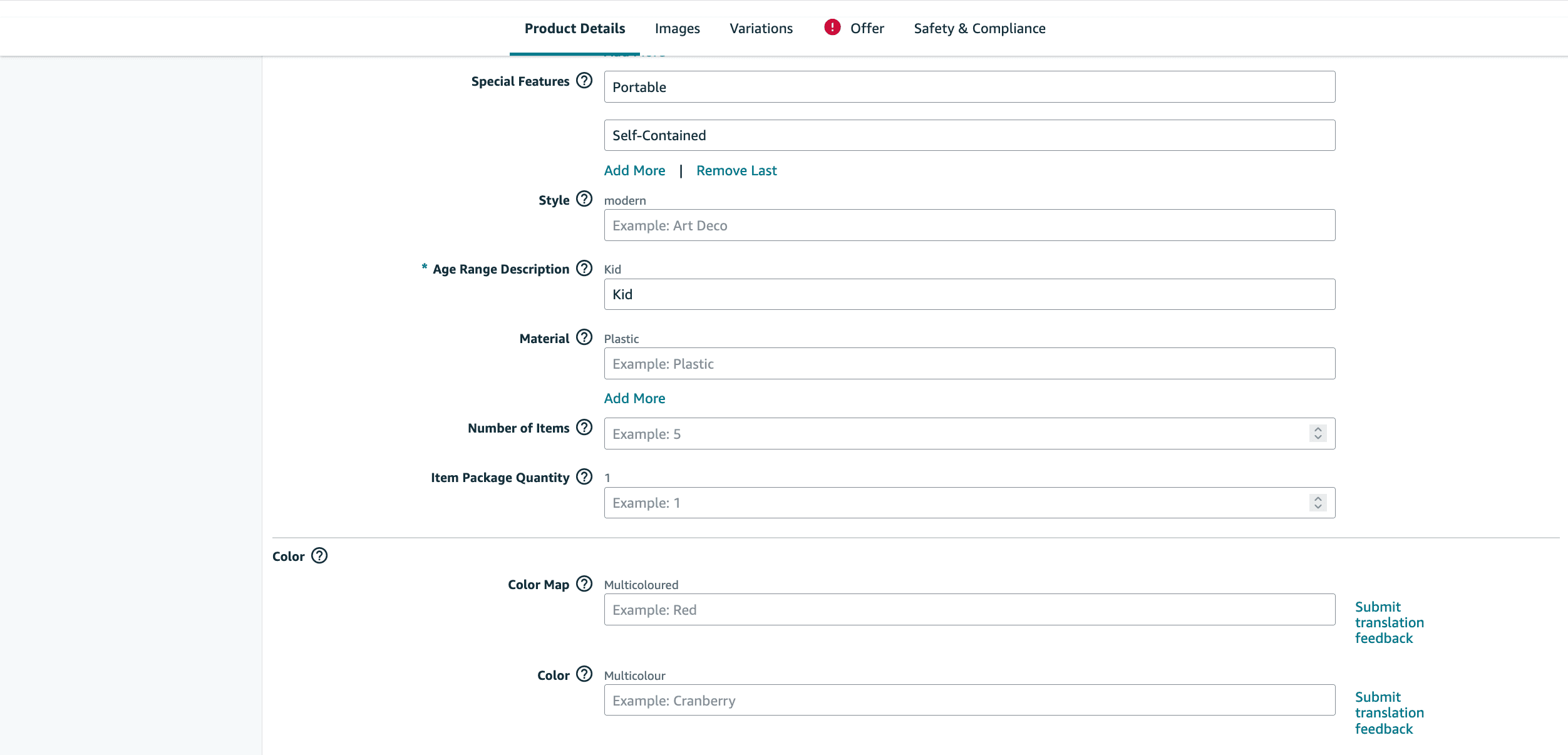
If you only have a few listings you can update the listings individually in Seller Central. You can go to the listing in Seller Central (Manage all inventory, then click 'Edit listing'). Under 'Product details', find the attributes to update and enter the values there.
- 04
Confirm the changes took
Check both the product listing and the Listing Quality Dashboard after Amazon processes the update. Amazon says dashboard changes can take up to 48 hours to appear.
Section 5
How to fix it in bulk
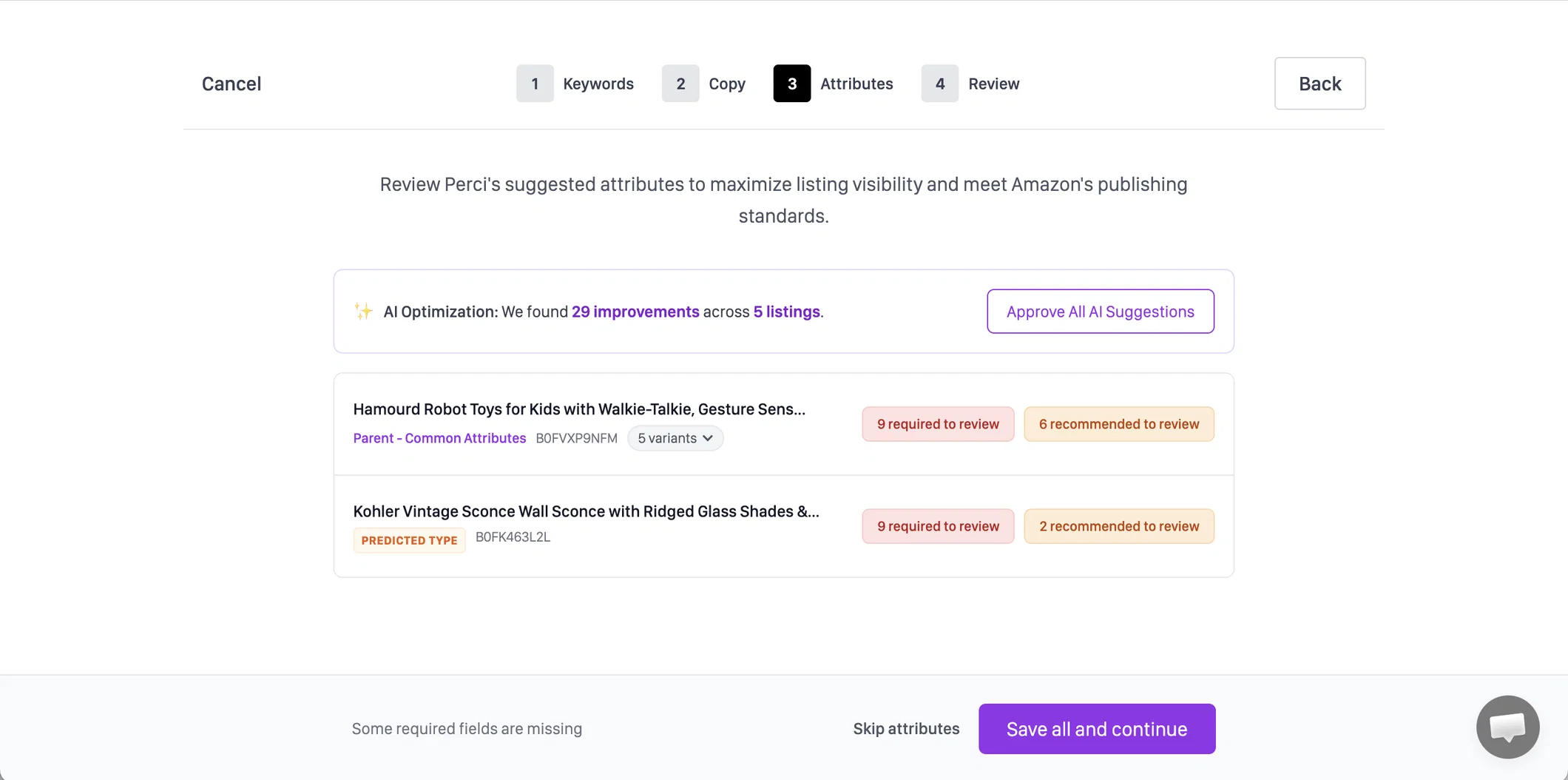
Perci completes required and recommended attributes across a catalog. It pulls each listing's product category,suggests values for the fields Amazon wants based on the listing product information, and publishes approved updates back. Work that repeats listing by listing becomes one managed pass across the catalog.
In a four-week pilot with a global CPG brand, full listing optimization across 12 listings produced a 21.5% average retail sales lift and $51.9K in additional sales, measured by the brand in Stackline.
BabyDan ran an eight-week A/B test on its best-selling German listing and measured 11.6% more sales, while exact-match keyword coverage rose from 7 keywords to 17.
Both results reflect full listing optimization - copy, keywords, and attributes together - not attribute completion alone.
One credit. No card.
Section 6
Frequently asked questions
Will fixing attributes definitely improve my sales?
No. More complete attributes can help Amazon match your product to shoppers using filters and other discovery features, but the sales effect depends on your category, competition, traffic, and the attributes you add. Anyone promising a specific lift from attributes alone is guessing.
Do I have to fill in every recommended attribute?
No. Fill in attributes that are true and relevant to how shoppers evaluate products in your category. If Amazon offers an “Attribute not applicable for product” option, use it when appropriate. Inventing a value to clear a recommendation creates worse product data.
How long until my changes appear?
Amazon says changes made through the Listing Quality Dashboard can take up to 48 hours to appear. Processing time can vary, so check the listing and dashboard again after that window.
Does this affect Alexa?
Amazon does not publicly document enough about how Alexa weighs individual listing attributes to make a reliable promise. Perci helps complete Amazon's structured listing data, but we do not claim a specific Alexa outcome.
My catalog is small. Should I use Perci for my attributes?
Probably not. If you have a few listings, the manual path above may be manageable and costs nothing beyond your time. Perci becomes useful when repeating that work across categories and hundreds or thousands of listings stops being practical.